Git 学习
Git是一个免费的开源的分布式版本控制系统,可以快速高效地处理从小型到大型的各种项目.
Git易于学习,占地面积小,性能极快。它具有廉价的本地库,方便的暂存区域和多个工作流分支,性能较于优越。
版本控制
可以记录文件的修改历史,方便版本切换。
利于团队协作
集中式版本控制工具
Section titled “集中式版本控制工具”集中化的版本控制器,,有一个单一的集中管理的服务器,保存所有文件的修订版本,而协同工作的人们都通过客户端连接到这台服务器,取出最新的文件或者提交更新。
分布式版本控制工具
Section titled “分布式版本控制工具”分布式版本控制工具,客户端提取的不是最新半百的文件快照,二十八代码仓库完整的镜像下来。这样任何一处协同工作的文件发生故障,都可以用其他客户端的本地仓库进行恢复
Git工作机制
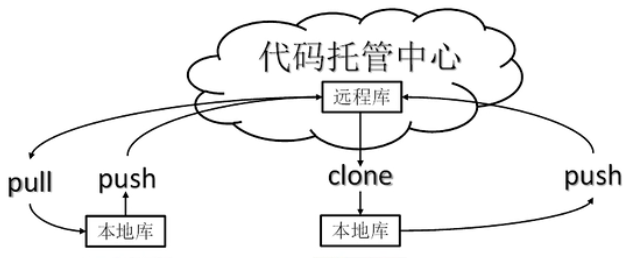
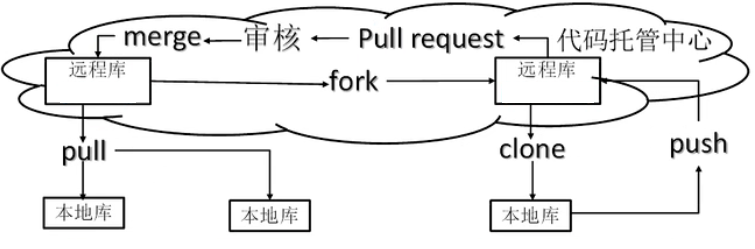
Section titled “Git工作机制”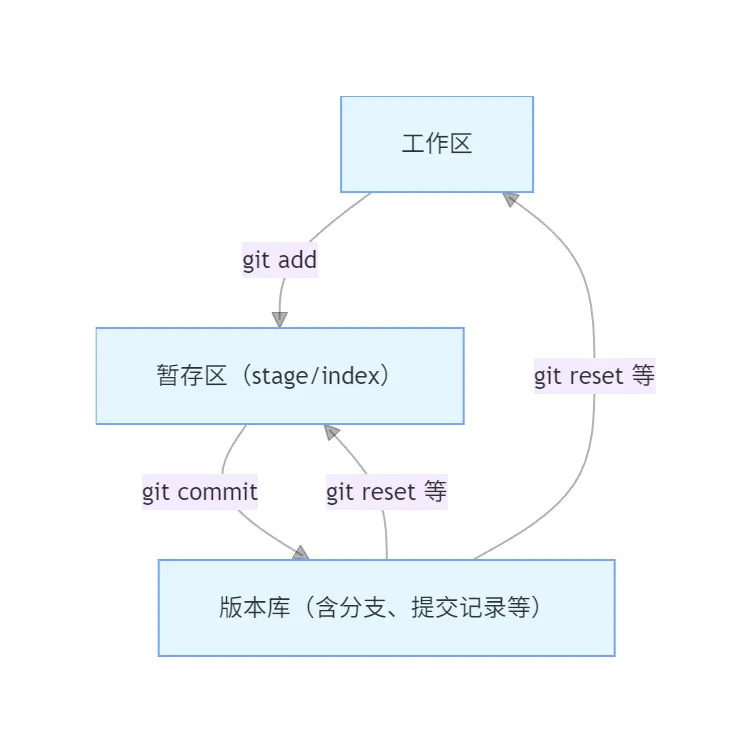
代码托管中心
Section titled “代码托管中心”代码托管中心是基于网络服务器的远程代码仓库,又称为远程库。
-
局域网
- GitLab(局域网)
-
互联网
- GitHub
- Gitee
默认安装即可
| 命令名称 | 作用 |
|---|---|
| git config —global user.name 用户名 | 设置用户签名 |
| git config —global user.email 邮箱 | 设置用户签名 |
| git config —global —list | 查看签名信息 |
| git init | 初始化本地库 |
| git status | 查看本地库状态 |
| git add 文件名 | 添加到暂存区 |
| git rm —cached | 删除暂存区的文件 |
| git commit -m “日志信息” 文件名 | 提交到本地库 |
| git reflog | 查看历史记录 |
| git reset —hard 版本号 | 版本穿梭 |
-
git init —初始化本地库
Terminal window yugut@778b MINGW64 /f/桌面/git$ git initInitialized empty Git repository in F:/桌面/git/.git/ -
git status —初始化本地库
当文件夹为空时
Terminal window yugut@778b MINGW64 /f/桌面/git (master)$ git statusOn branch masterNo commits yetnothing to commit (create/copy files and use "git add" to track)上传文件后
Terminal window yugut@778b MINGW64 /f/桌面/git (master)$ vim hello.txt...yugut@778b MINGW64 /f/桌面/git (master)$ git statusOn branch masterNo commits yetUntracked files:(use "git add <file>..." to include in what will be committed)hello.txtnothing added to commit but untracked files present (use "git add" to track) -
git add —添加到暂存区
Terminal window yugut@778b MINGW64 /f/桌面/git (master)$ git add hello.txtwarning: in the working copy of 'hello.txt', LF will be replaced by CRLF the next time Git touches it#warning是git自动转换换行符.windows下的换行符为CRLF,Linux下的换行符为LF.此时使用
git statusTerminal window yugut@778b MINGW64 /f/桌面/git (master)$ git statusOn branch masterNo commits yetChanges to be committed:(use "git rm --cached <file>..." to unstage)new file: hello.txt#可以发现文件现在在暂存区,这里的文件是可以删掉的.#删掉的是暂存区里的hello.txt,而工作区的hello.txt还在. -
git rm —cached
—删除暂存区的文件 Terminal window yugut@778b MINGW64 /f/桌面/git (master)$ git rm --cached hello.txtrm 'hello.txt'yugut@778b MINGW64 /f/桌面/git (master)$ git statusOn branch masterNo commits yetUntracked files:(use "git add <file>..." to include in what will be committed)hello.txtnothing added to commit but untracked files present (use "git add" to track)#可以发现hello.txt已不再暂存区. -
git commit —提交到本地库
Terminal window yugut@778b MINGW64 /f/桌面/git (master)$ git commit -m "first commit" hello.txtwarning: in the working copy of 'hello.txt', LF will be replaced by CRLF the next time Git touches it[master (root-commit) 053c617] first commit1 file changed, 9 insertions(+)create mode 100644 hello.txtyugut@778b MINGW64 /f/桌面/git (master)$ git statusOn branch masternothing to commit, working tree clean053c617:版本号
-
git reflog —查看版本信息
Terminal window yugut@778b MINGW64 /f/桌面/git (master)$ git reflog053c617 (HEAD -> master) HEAD@{0}: commit (initial): first commit -
git log —查看详细的信息
Terminal window yugut@778b MINGW64 /f/桌面/git (master)$ git logcommit 053c617f4c0bdb2e171d8dc3f4278b4751b9e7cd (HEAD -> master)Author: viys <2628587386@qq.com>Date: Wed Mar 1 09:53:06 2023 +0800first commit -
git 命令 —修改文件
Terminal window yugut@778b MINGW64 /f/桌面/git (master)$ cat hello.txt #原文件hello git!hello git!hello git!hello git!hello git!hello git!hello git!hello git!hello git!yugut@778b MINGW64 /f/桌面/git (master)$ cat hello.txt #修改后的文件hello git!hello git!hello git!hello git!hello git!hello git!hello git!hello git!hello git!the txt was changedyugut@778b MINGW64 /f/桌面/git (master)$ git status #查看本地库的状态On branch masterChanges not staged for commit:(use "git add <file>..." to update what will be committed)(use "git restore <file>..." to discard changes in working directory)modified: hello.txt #文件被修改no changes added to commit (use "git add" and/or "git commit -a")yugut@778b MINGW64 /f/桌面/git (master)$ git add hello.txt #将修改后的文件添加到暂存区warning: in the working copy of 'hello.txt', LF will be replaced by CRLF the next time Git touches ityugut@778b MINGW64 /f/桌面/git (master)$ git commit -m "second commit" hello.txt #将修改后的文件提交到本地库warning: in the working copy of 'hello.txt', LF will be replaced by CRLF the next time Git touches it[master 24c5547] second commit1 file changed, 1 insertion(+)yugut@778b MINGW64 /f/桌面/git (master)$ git status #查看本地库状态On branch masternothing to commit, working tree cleanyugut@778b MINGW64 /f/桌面/git (master)$ git reflog #查看历史版本24c5547 (HEAD -> master) HEAD@{0}: commit: second commit053c617 HEAD@{1}: commit (initial): first commit -
git reset —hard 版本号 — 版本穿梭
Terminal window yugut@778b MINGW64 /f/桌面/git (master)$ git reflog #查看历史记录24c5547 (HEAD -> master) HEAD@{0}: commit: second commit053c617 HEAD@{1}: commit (initial): first commityugut@778b MINGW64 /f/桌面/git (master)$ git reset --hard 053c617 #版本穿梭HEAD is now at 053c617 first commityugut@778b MINGW64 /f/桌面/git (master)$ git reflog #查看历史记录053c617 (HEAD -> master) HEAD@{0}: reset: moving to 053c61724c5547 HEAD@{1}: commit: second commit053c617 (HEAD -> master) HEAD@{2}: commit (initial): first commityugut@778b MINGW64 /f/桌面/git (master)$ cat hello.txt #查看hello.txt文件发现是第一次提交的文件.hello git!hello git!hello git!hello git!hello git!hello git!hello git!hello git!hello git!
在版本控制中,同时推送多个任务,为每个任务,我们就可以创建每个任务的单独分支.使用分支意味着程序员可以把自己的工作从开发主线上分离开来,开发自己分支的时候,不会影响主线分支的运行.(分支的底层是指针的引用).
同时并行推进多个功能开发,提高开发效率 .
| 命令名称 | 作用 |
|---|---|
| git branch 分支名 | 创建分支 |
| git branch -v | 查看分支 |
| git checkout 分支名 | 切换分支 |
| git merge 分支名 | 把指定的分支合并到当前分支上 |
-
查看分支
git branch -v —查看分支
Terminal window yugut@778b MINGW64 /f/桌面/git (master)$ git branch -v #查看分支* master 053c617 first commit -
git branch —创建分支
Terminal window yugut@778b MINGW64 /f/桌面/git (master)$ git branch hot-fix #创建分支yugut@778b MINGW64 /f/桌面/git (master)$ git branch -v #查看分支hot-fix 053c617 first commit* master 053c617 first commit -
修改分支
Terminal window yugut@778b MINGW64 /f/桌面/git (master)$ cat hello.txt #查看master分支下的hello.txt文件hello git!hello git!hello git!hello git!hello git!hello git!hello git!hello git!hello git!yugut@778b MINGW64 /f/桌面/git (master)$ git checkout hot-fix #切换到hot-fix分支Switched to branch 'hot-fix'yugut@778b MINGW64 /f/桌面/git (hot-fix)$ vim hello.txt #修改hot-fix分支下的hello.txt文件yugut@778b MINGW64 /f/桌面/git (hot-fix)$ cat hello.txt #查看修改后的文件hello git!hello git!hello git!hello git!hello git!hello git!hello git!hello git!hello git!change in hot-fix.yugut@778b MINGW64 /f/桌面/git (hot-fix)$ git status #查看本地库状态On branch hot-fixChanges not staged for commit:(use "git add <file>..." to update what will be committed)(use "git restore <file>..." to discard changes in working directory)modified: hello.txtno changes added to commit (use "git add" and/or "git commit -a")yugut@778b MINGW64 /f/桌面/git (hot-fix)$ git add hello.txt #将文件添加到暂存区yugut@778b MINGW64 /f/桌面/git (hot-fix)$ git status #查看本地库状态On branch hot-fixChanges to be committed:(use "git restore --staged <file>..." to unstage)modified: hello.txtyugut@778b MINGW64 /f/桌面/git (hot-fix)$ git commit -m "hot-fix first commit" hello.txt #将文件提交到本地库[hot-fix 9a76c71] hot-fix first commit1 file changed, 1 insertion(+)yugut@778b MINGW64 /f/桌面/git (hot-fix)$ git reflog #查看版本信息9a76c71 (HEAD -> hot-fix) HEAD@{0}: commit: hot-fix first commit053c617 (master) HEAD@{1}: checkout: moving from master to hot-fix053c617 (master) HEAD@{2}: reset: moving to 053c61724c5547 HEAD@{3}: commit: second commit053c617 (master) HEAD@{4}: commit (initial): first commityugut@778b MINGW64 /f/桌面/git (hot-fix)$ git checkout master #切换分支到masterSwitched to branch 'master'yugut@778b MINGW64 /f/桌面/git (master)$ cat hello.txt #查看master分支下的文件,发现无改动hello git!hello git!hello git!hello git!hello git!hello git!hello git!hello git!hello git!yugut@778b MINGW64 /f/桌面/git (master)$ git checkout hot-fix #切换分支到hot-fixSwitched to branch 'hot-fix'yugut@778b MINGW64 /f/桌面/git (hot-fix)$ cat hello.txt #查看hot-fix下的文件,发现其与master下的文件互不影响hello git!hello git!hello git!hello git!hello git!hello git!hello git!hello git!hello git!change in hot-fix. -
git merge 分支名 —分支合并
Terminal window yugut@778b MINGW64 /f/桌面/git (master)$ vim hello.txt #修改master分支下的文件yugut@778b MINGW64 /f/桌面/git (master)$ cat hello.txt #查看master分支下的hello.txt文件hello git! changed in masterhello git!hello git!hello git!hello git!hello git!hello git!hello git!hello git!... #将工作区的文件提交到本地库yugut@778b MINGW64 /f/桌面/git (master)$ git merge hot-fix #将hot-fix分支合并到master分支上Auto-merging hello.txtMerge made by the 'ort' strategy.hello.txt | 1 +1 file changed, 1 insertion(+)yugut@778b MINGW64 /f/桌面/git (master)$ cat hello.txt #查看hello.txt文件hello git! changed in masterhello git!hello git!hello git!hello git!hello git!hello git!hello git!hello git!change in hot-fix.#冲突合并#合并分支时,两个分支在同一个文件的同一个位置有两套完全不同的修改.#Git无法替我们决定使用哪一个,必须人为决定新代码的内容.yugut@778b MINGW64 /f/桌面/git (master)$ git merge hot-fix #将hot-fix分支合并到master分支上Auto-merging hello.txtCONFLICT (content): Merge conflict in hello.txtAutomatic merge failed; fix conflicts and then commit the result.yugut@778b MINGW64 /f/桌面/git (master|MERGING)$ cat hello.txt #查看冲突文件hello git!hello git!hello git!hello git!hello git!hello git!hello git!hello git!hello git!<<<<<<< HEAD=======change in hot-fix.>>>>>>> hot-fixyugut@778b MINGW64 /f/桌面/git (master|MERGING)$ vim hello.txt #修改冲突文件yugut@778b MINGW64 /f/桌面/git (master|MERGING)$ cat hello.txt #查看修改后的冲突文件hello git!hello git!hello git!hello git!hello git!hello git!hello git!hello git!hello git!change in hot-fix.yugut@778b MINGW64 /f/桌面/git (master|MERGING)$ git status #查看本地库状态On branch masterYou have unmerged paths.(fix conflicts and run "git commit")(use "git merge --abort" to abort the merge)Unmerged paths:(use "git add <file>..." to mark resolution)both modified: hello.txtno changes added to commit (use "git add" and/or "git commit -a")yugut@778b MINGW64 /f/桌面/git (master|MERGING)$ git add hello.txt #添加文件到暂存区yugut@778b MINGW64 /f/桌面/git (master|MERGING)$ git commit -m "merge test" #提交修改后的文件,注意带文件名会报错[master c2df9ea] merge testyugut@778b MINGW64 /f/桌面/git (master)$ -
git push -<参数> <远端> <分支> —推送代码到远端
git push 参数 含义 -f 强制更新 -u 设置默认远端 -
git clone <远端> —克隆远端代码